

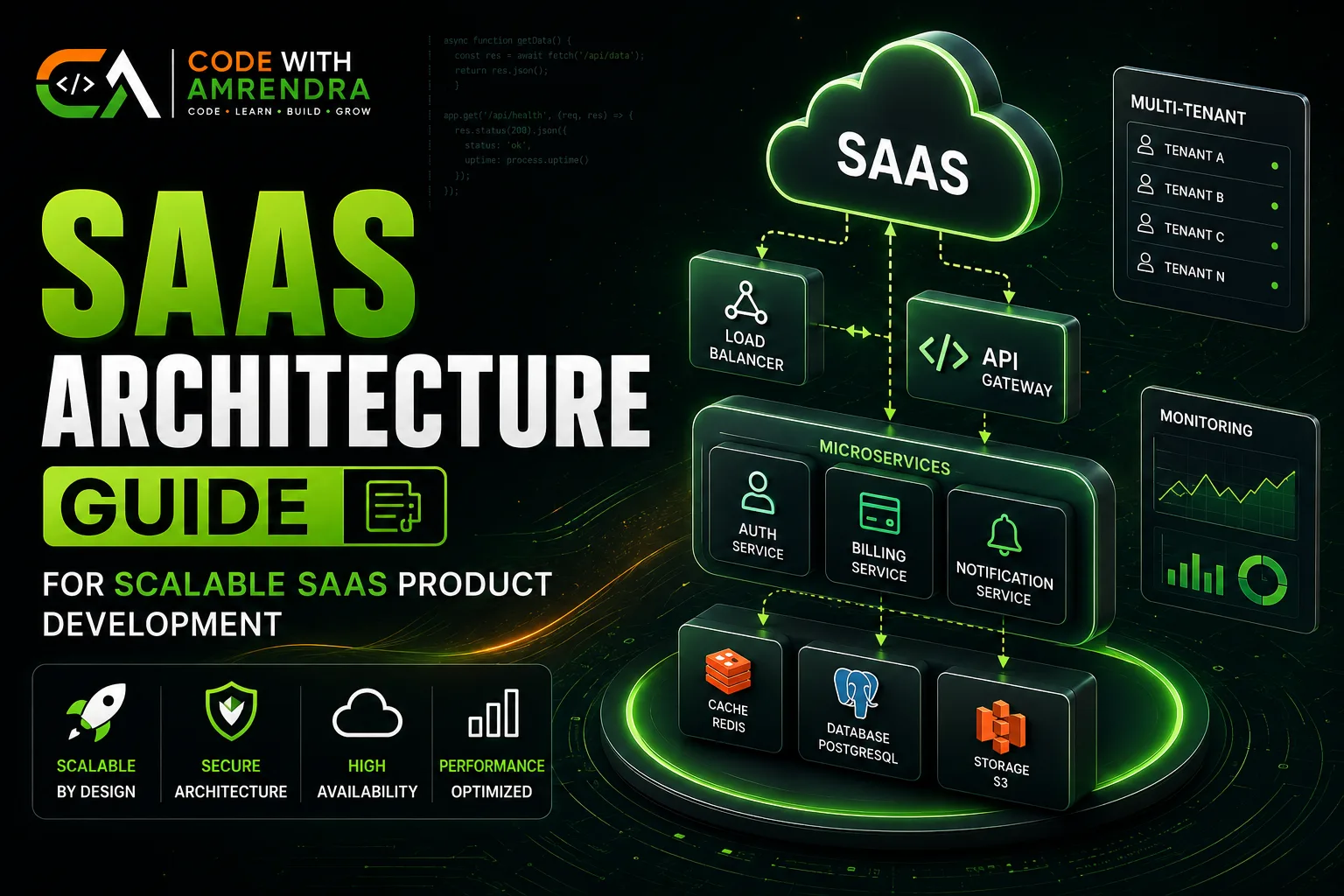
Most SaaS products do not fail due to unqualified code. Unfortunately, they fail because the architecture choices regarding the tenancy model, database shape, auth pattern, etc. made at month one get very costly to change by month twelve. This guide covers the real choices that count in SaaS application development, in the order you'll face them.
Quick Answer
A solid SaaS architecture needs four decisions locked early: multi-tenancy model (shared DB, siloed DB, or hybrid), database strategy (relational vs hybrid), auth pattern (session vs token-based, with role-based access), and API shape (REST is still the default for most SaaS in 2026).
Get these four right and you can scale from 100 to 100,000 users without a rewrite. These are exactly the decisions a good SaaS product development services partner should map out before writing a single line of code.
What "SaaS Architecture" Actually Means
SaaS architecture is a series of decisions that makes it possible to have one codebase that provides services for multiple customers (tenants) simultaneously, safely and profitably. A SaaS product needs to be able to address some questions that a "standard" website would never have to: How will you prevent Tenant A's data from appearing in Tenant B's dashboard?
What is the best way to charge per seat without having to go through the support ticket process at each renewal? How to send a feature to one of the customers' beta, without breaking the others?
Get this foundation wrong, and every feature after it costs more to build. Get it right, and your engineering velocity stays flat even as your customer count climbs. This is why experienced SaaS software development services spend real time on architecture before touching the UI.
Multi-Tenancy Models Compared
This is the first fork in the road, and the hardest one to change later.
| Model | How It Works | Best For | Trade-off |
| Shared DB, Shared Schema | All tenants in one database, one set of tables, filtered by tenant_id | Early-stage SaaS, most B2B tools | Cheapest to run, but a bad query can leak cross-tenant data if row-level security isn't enforced |
| Shared DB, Separate Schema | One database, one schema per tenant | Mid-size SaaS needing more isolation | Better isolation, but schema migrations run once per tenant — slower at scale |
| Siloed (DB per tenant) | Each tenant gets a fully separate database | Healthcare, finance, enterprise contracts requiring data isolation | Strongest isolation and easiest compliance story, but infrastructure cost and ops overhead grow linearly with tenant count |
| Hybrid | Shared DB by default, siloed DB for enterprise/compliance-heavy tenants | SaaS selling to both SMB and enterprise | Most flexible, but doubles the code paths you have to maintain and test |
It is not a “wrong” model, it is an under-building of row-level security from day one which is the mistake of most SaaS products that start shared-schema. If you have hospitals, banks or government as a buyer, it is best to plan for a siloed or hybrid installation from the beginning because it is much more costly to install isolation retroactively after a compliance audit.
A good SaaS development agency will ask about your target customer segment before recommending a tenancy model, not after.
Our case study on a healthcare dashboard is a real example of a SaaS product where isolation requirements shaped the architecture from day one.
Database Strategy for SaaS
Once tenancy is decided, the database itself needs a strategy, not just a technology pick.
- Relational (Postgres/MySQL) is still the default for most SaaS in 2026 transactional integrity matters more than raw write throughput for the majority of B2B products.
- Indexing on
tenant_idis non-negotiable in shared-schema setups. Skipping this is the single most common performance bug in early SaaS products queries that felt instant at 50 tenants crawl at 500.
- Read replicas become worth the setup cost once dashboards and reports start competing with write traffic from the app itself.
- A separate analytics/reporting database (even a simple replicated warehouse) avoids the classic failure mode: a heavy internal report locking up production for paying customers.
If you're deciding between fully custom infrastructure and managed services here, this overlaps directly with saas development cost decisions managed Postgres (RDS, Supabase, Neon) removes most of the operational burden for teams under 20 engineers a detail worth raising early in any SaaS application development conversation with your engineering partner.
Authentication & Authorization Patterns
Two separate problems get conflated here, and separating them early saves rework:
- Authentication : proving who the user is. Token-based auth (JWT or session tokens via a provider like Auth0, Clerk, or a custom implementation) is standard. For B2B SaaS, plan for SSO (SAML/OIDC) earlier than you think it's often a hard requirement for the first enterprise deal, not a nice-to-have.
- Authorization : deciding what that authenticated user can do. Role-based access control (RBAC) covers most SaaS needs (Admin, Member, Viewer). Attribute-based access control (ABAC) is worth the added complexity only once customers start asking for custom permission sets don't build it speculatively
A common early mistake: hardcoding role checks (if user.role === 'admin') scattered across the codebase instead of centralizing permission logic in one place. This is fine at 5 routes, painful at 50. SSO and fine-grained permissions are also a common line item that quietly pushes up SaaS development cost once an enterprise buyer asks for them mid-negotiation.
API Design: REST, GraphQL, or RPC
Most SaaS products that are launching in 2026 will still be the pragmatic default for REST — it's well understood, cacheable, and every frontend framework, and all third-party integrators expect it. Although it's quite simple to use, GraphQL becomes complex when you have to generate multiple nested resources in the same screen (dashboards containing deeply related data) or when you're going to share an API with third-party developers that want to query it flexibly.
Whichever you choose, three things matter more than the protocol itself:
-
Versioning from day one (
/v1/...) — retrofitting versioning after your first external integration exists is painful. -
Consistent error shapes — a predictable error format saves hours of debugging for both your team and any API consumers.
-
Rate limiting per tenant, not just globally — one noisy customer's integration script shouldn't degrade the experience for everyone else. These are the kind of details that separate solid SaaS product development services from a team that's only ever shipped single-tenant apps.
Billing & Subscription Architecture
Billing looks simple until you have proration, plan upgrades mid-cycle, failed payments, and usage-based add-ons all interacting. The practical approach for most SaaS teams:
-
Don't build billing logic from scratch. Stripe Billing or a Razorpay-equivalent subscription API handles the genuinely hard parts (proration math, dunning/retry logic, tax calculation) that are not worth reinventing.
-
Treat your billing provider as the source of truth for subscription state, and sync it into your own database via webhooks. Don't try to compute subscription status independently in your app logic.
-
Usage-based billing (metered add-ons, API call limits) needs its own event-tracking pipeline separate from your core transactional database, or reporting queries will slow down billing calculations.
Billing complexity is one of the most underestimated drivers of SaaS development cost teams that plan for proration and dunning logic upfront to avoid a painful mid-project scope increase. It's also one of the first things reliable SaaS software development services will scope out with you before quoting a timeline.
Microservices vs Modular Monolith
This is one of the most discussed architecture choices in SaaS and the default choice is incorrect for most startups because they are simply implementing what the larger players are at a very different scale.
The short answer: A monolith made up of modules, with distinct boundaries one deployable codebase is typically the best starting point. Whereas microservices address technical problems with scaling an organization, they address many other organizational scaling problems that most SaaS solutions don't have at this point.
For the full breakdown : including when microservices genuinely earn their operational cost, and how to structure a monolith so it can be split later without a rewrite see our detailed comparison: Microservices vs Modular Monolith in 2026: Which Architecture Actually Scales?
Any SaaS development agency recommending microservices for a pre-product-market-fit startup is usually optimizing for their own comfort with the pattern, not for your actual scaling needs.
Scaling Path: 100 to 100,000 Users
| Stage | Users | What Usually Breaks First | What to Fix |
| Early | 100–1,000 | Nothing yet — resist the urge to over-engineer | Add tenant_id indexes, basic monitoring |
| Growth | 1,000–10,000 | Slow dashboard queries, N+1 query bugs | Read replicas, query optimization, caching layer |
| Scale | 10,000–50,000 | Database write contention, noisy-tenant problems | Connection pooling, per-tenant rate limits, background job queues |
| Enterprise | 50,000–100,000+ | Compliance asks, single points of failure | Consider siloed DB for enterprise tier, multi-region if global customers demand it |
The trend with virtually every SaaS scaling story: making things complicated (caching, queues, replicas) when the need arises when that particular problem comes to them.
Whether a customer is at the growth stage or not, it's a key factor we adhere to in each SaaS application development project we undertake and a question we ask every SaaS software development services provider before we sign a contract: Do they build at your scale or their envisioned scale?
This same discipline applies across the board, whether you're evaluating SaaS product development services for a brand-new build or bringing in help to fix an existing product's growing pains.
Hidden Costs & Mistakes Founders Make
-
Skipping tenant isolation testing : "it works for my test account" is not the same as verified cross-tenant isolation. This surfaces as a security incident, not a bug report.
-
No plan for tenant offboarding : data export and deletion (often a legal requirement, GDPR-style) is usually an afterthought until a customer churns and asks for their data back.
-
Underestimating webhook reliability work: billing providers, email services, and integrations all send webhooks that can arrive late, out of order, or twice. Idempotency handling is not optional at scale.
-
Treating background jobs as an afterthought: report generation, email sending, and data syncs left running synchronously in request handlers is one of the most common causes of slow page loads in SaaS dashboards.
-
No staging environment matching production tenancy : bugs that only appear with multiple real tenants don't show up in a single-tenant dev setup.
If you're scoping a new SaaS build and want these decisions mapped to your specific product before you write code, our web development team does architecture planning as the first step of any SaaS engagement before a single screen is designed.
Most of the mistakes above are also the biggest silent contributors to SaaS development cost overruns, which is exactly why a capable SaaS development agency treats this planning stage as non-negotiable, not optional paperwork.
Conclusion
Getting SaaS architecture right, early tenancy model, database strategy, auth, API design, and billing is what lets a product scale from 100 to 100,000 users without a rewrite.
Most of the expensive mistakes covered in this guide aren't technology mistakes, they're planning mistakes made before the first sprint starts.
Whether you're planning your first SaaS application development sprint or re-architecting an existing product, treat these decisions as a planning exercise, not something to figure out mid-build.
We offer this kind of architecture review as part of our broader SaaS software development services, and it's usually the fastest way to avoid the mistakes listed above. If you're comparing SaaS product development services for an upcoming build, or already mid-project and hitting scaling issues, get in touch and we'll walk through your specific requirements no generic quote, just a straight answer on what your architecture actually needs.